CoraDB Graph Viewer manual
Browse a CoraDB multi-model database and see its graph data as interactive graphs, tables, matrices and charts.
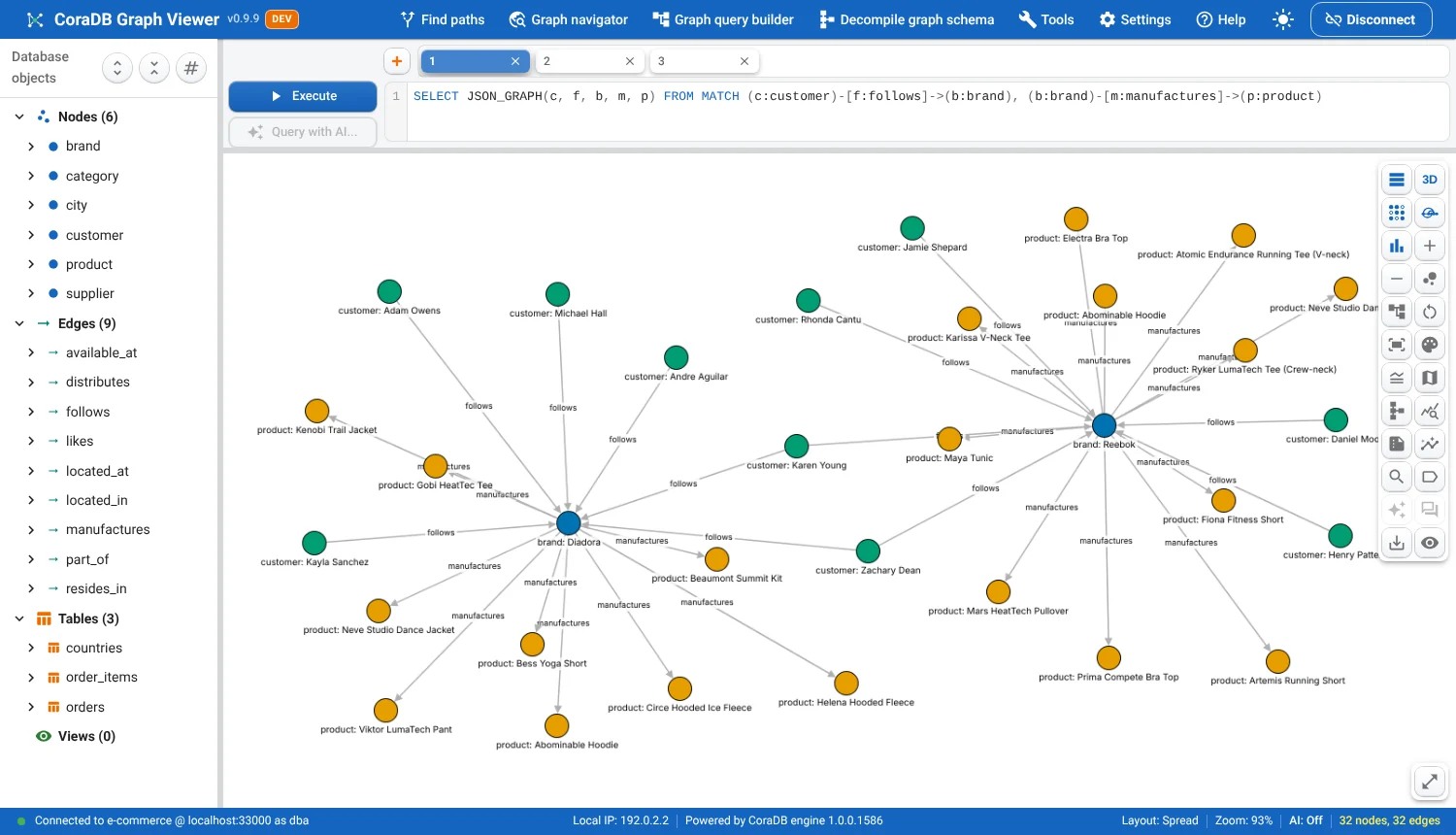
The main window
After you connect to a database, the window has five areas:
- Header (top, blue): the main features (Find paths, Graph navigator, Graph query builder, Decompile graph schema), the Tools, Settings and Help menus (About is in Help), the theme and the Connect / Disconnect button.
- Database objects tree (left): the database's nodes, edges, tables and views with their columns. See Database objects tree.
- Execute SQL panel (top): query tabs, the SQL editor, Execute and Query with AI. See Execute SQL panel.
- Graph area (centre): the result of the active tab's query, with its toolbar on the right. See 2D graph view and the other views.
- Status bar (bottom): the connection, your IP, the CoraDB engine version, the current layout and zoom, whether AI is on, and the number of nodes and edges shown.


A typical session
- Connect to a database (or start Demo/Learning mode).
- Run Decompile graph schema once per database. It finds which node types each edge type connects; Find paths, the Graph navigator, the query builder and several other features need it.
- Write a graph query that returns
JSON_GRAPH(...)and click Execute, or let a feature build the query for you. Help ▸ CoraDB SQL Graph syntax intro explains the query language. - Explore the result: switch between the 2D, 3D, table, matrix, arc and statistics views, run analytics, search, change layouts and export.
Graph views
2D graph viewThe interactive graph and its toolbar.
Right-click menusNode, edge and background menus; properties windows.
3D graph viewThe same graph in three dimensions.
Table (data) viewEvery connection as a row of properties.
Adjacency matrixWhich node links to which, as a grid.
Arc diagramNodes on a line, edges as arcs.
StatisticsCounts, degrees, communities and charts.
Header features
Find pathsEvery way two node types connect, or the shortest path between two records.
Graph navigatorStart at one node and walk to its neighbours.
Graph query builderBuild a MATCH query hop by hop.
Decompile graph schemaDiscover how node and edge types connect.
Menus
ToolsConnection check, performance check, demo graph, AI usage and history, errors log, feedback, clearing preferences.
SettingsOptions, AI configuration, daily AI limits, loading and saving settings, panels.
HelpThis manual and the CoraDB SQL Graph syntax intro.
AboutVersion, technologies, licence and links.
Use the search box at the top of every page (press /) to find a feature, a button or a setting. Click a screenshot to see it full size.